
 Posted by
We’re back from our team days! Last week, we met in the beautiful Black Forest to talk about the company, our work processes, and AI. Nevertheless, a lot has happened in the weeks leading up to this release, which we are now able to present as v3.138: Images can now display additional information, such as copyright details or whether an image was generated by AI; split entries can be processed directly during bank statement import; and new login options are available via SAML and OpenID Connect. You can also expect improvements to users, groups, permissions, and many other areas. Here’s an overview.
More information directly on images
Generative AI has become part of everyday life, and more and more churches are taking advantage of the opportunities it offers. We believe it’s important to know what you’re looking at. That’s why you can now add additional information to images, including whether an image was created using AI, its source, and an image description. This information can be displayed directly on the image. For example, this allows image sources to be clearly identified and information about an image’s origin to be made visible.


Sort entries in Groups and Wiki independently
Lists in Groups and Wiki can now be sorted independently of the table view. This allows you to change the order of entries without affecting how the table is sorted. That way, you can keep both views organized exactly how you need them.

Shorten person mentions more easily
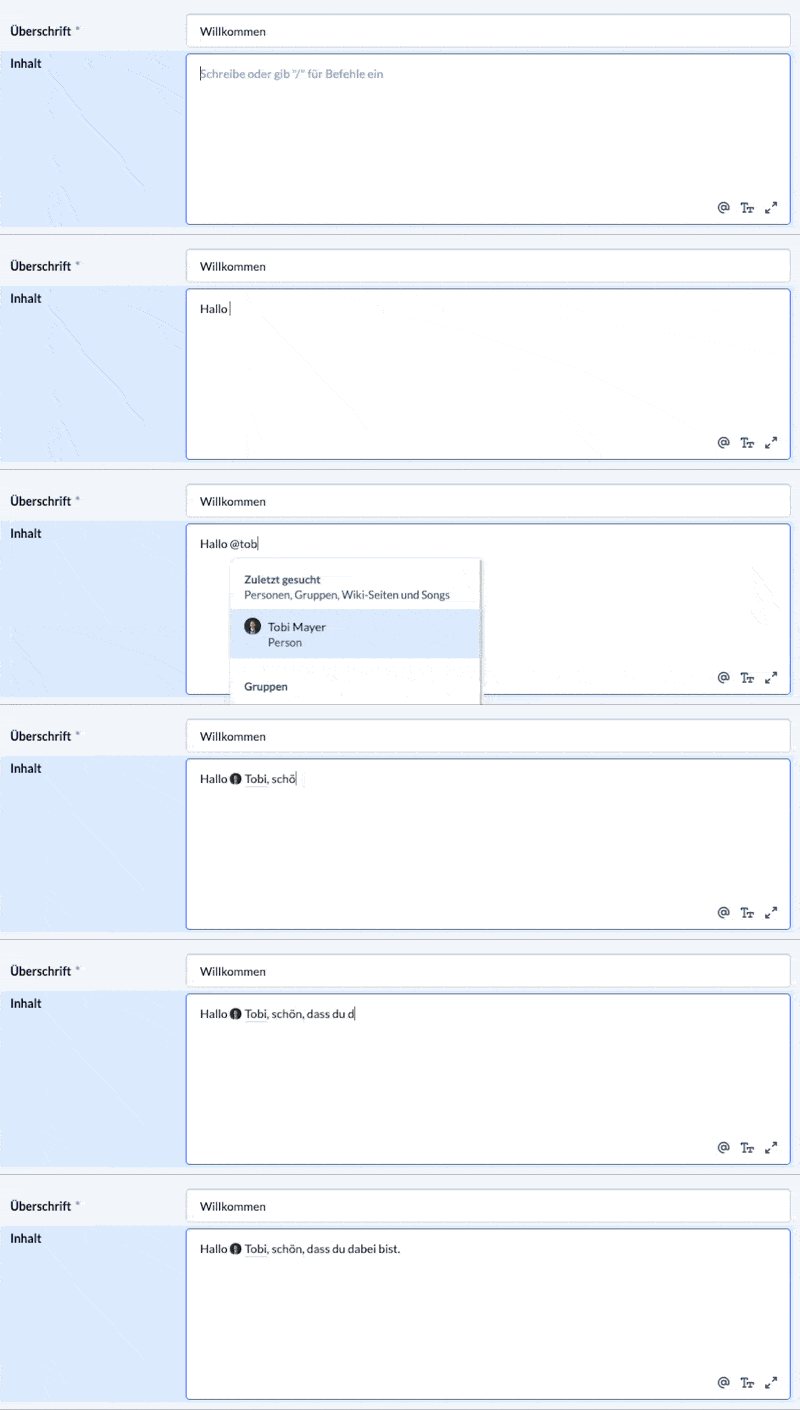
When you mention a person in the new editor, you can now use the Backspace key to shorten the mention to just the first name. For example, you can quickly turn a mention that includes both a first and last name into a more personal form of address using only the first name, without having to reinsert the mention entirely.
Person details in the new layout
The personal details section in the people module has received a new layout. This brings it in line with the updated ChurchTools interface.
Edit and color-code person tags
You can now edit existing person tags and assign individual colors to them. This makes it easier to distinguish between tags and keep your people organized. For example, using different colors for different categories helps you identify them at a glance.

Hide specific people from lists
A new dedicated permission allows you to hide people from people lists and selection menus. This gives you more control over which people are visible in these views. For example, you can keep certain person records out of general selection lists when they shouldn’t be visible to other users.


Identify newsletter connections more easily
If a newsletter list is already linked to a group, the associated visible group is now displayed. This makes it easier to see which group is connected to an existing newsletter list and manage your newsletter connections.
Automatically pause newsletters when archiving groups
When you archive a group, the newsletters linked to it are now automatically paused. As soon as you reactivate the group, the newsletters will resume. This means you no longer have to manually manage the newsletter links when a group is archived.
Set the minimum age for registration and consent in one place
You can now set the minimum age for registration and for submitting the consent form independently in the system settings under “Consent Form.” This allows you to find both settings in one central location and makes it easier to manage the age limit for your community.

Skip email steps in routines
In group routines, you can now choose to automatically skip email steps for people who don’t have an email address on file. This is particularly useful when a routine contains several steps and not every participant can be reached by email. The routine can then continue even if someone doesn’t have an email address.

Easier service scheduling for event admins
Event admins can now select available people when assigning services without needing additional permissions for the respective service groups. This simplifies planning for church services and events, as event admins can assign people directly without first requiring additional group permissions.
Keep confirmed bookings when splitting a series
When you split a recurring appointment or booking series, previously confirmed resource bookings are now preserved as long as the date and time remain unchanged. For example, if you split a recurring room reservation, you won’t need to have all previously confirmed bookings approved again.
Split entries directly when importing bank statements
When importing bank statements, split entries can now be suggested, saved temporarily, and posted. This allows you to divide a single payment into multiple accounting entries directly during the import. For example, this is useful when a bank transfer needs to be allocated to different cost centers or accounts. You can prepare the split during the import and post the transactions afterward.

Import Austrian bank statements
ChurchTools now supports the Austrian STUZZA-CAMT format for importing bank statements. This allows churches in Austria to import bank statements in this format directly into the Finance module and process them there.
Protect sensitive permissions
Authorized administrators can now lock sensitive permissions. Once locked, these permissions can only be granted or revoked by the appropriate authorized administrators. This helps prevent, for example, other administrators from unintentionally modifying particularly broad access rights or granting permissions without anyone noticing.


REST API comprehensively updated
The entire REST API has been reviewed, revised, supplemented, and expanded using AI. This has further improved the foundation for connecting external systems and developing custom integrations. These enhancements are particularly helpful for developers who connect ChurchTools with other applications.
Link registration groups to appointments afterward
Using the Groups PATCH API, you can now link an existing registration group to an appointment afterward. This makes automated workflows easier when a registration group is created first and only linked to a specific appointment later.
OpenID Connect as a login provider
In addition to OAuth, ChurchTools now supports OpenID Connect as a login provider. This allows you to use a compatible external identity system for authentication. Existing login solutions within your organization can be connected to ChurchTools, allowing users to sign in with their centrally managed accounts.

Set up SAML authentication
You can now set up and configure SAML authentication for ChurchTools in the system settings. This makes it possible to sign in using an external identity system. For example, if your organization already uses centralized user management, you can also use it to manage access to ChurchTools.

Further changes
If this is not enough for you, you will find all changes of this and earlier versions in our Changelog.
We hope you like the new version as much as we do. As always, you may leave praise and constructive feedback in our forum.