
 Posted by
 As I write these lines, the sun is once again shining through my office window. I look at the long changelog and wonder: Is it a coincidence that the developers fixed 99 bugs, or is it a tribute to this tweet by Alex Shchepetilnikov? Either way, the changelog is long, and alongside all those bug fixes, there are plenty of useful improvements. Among other things, you can look forward to formatting and mentions in events, newsletter integrations have made their way into the new Groups module, and there is another new setting for group registrations. Let’s dive in together. 🤿
The old Groups module has been removed
With this release, we’re ushering in a new era. This is the first version of ChurchTools that no longer includes the old Groups module. 🎉 The old Groups module has been removed from ChurchTools. Work on the new – and by now standard – Groups module began several years ago, and it was clear to us that we would only switch off the old module once all the necessary features had been migrated. We’ve been looking forward to this day for a long time, and now it’s finally here.
More content directly in the mention menu
The mention menus in the Markdown editor now also show group content and wiki pages from a category directly. This makes it quicker to find relevant content and mention it in your text without any detours.
You can open the menu in the editor by typing /. The mention menu will open immediately.

Disable email verification for group registrations
The next two items were among the remaining requirements for retiring the old Groups module. With v3.137, we’ve added a new option for group registrations.
Email verification can now be disabled for registrations. This lets you decide whether a participant has to confirm their email address before completing the registration.
But be careful: this change can result in duplicate people in your system because, for example, people may be created directly without checking whether a person record already exists. As Uncle Ben says: With great power comes great responsibility.


Link newsletter lists to groups
Newsletter lists can now be linked directly to a group in the group settings. The member table and group membership details also show the newsletter status of each group member, for example “Opt-in successful” or “Unsubscribed”. This makes it easy to see directly within the group who receives the associated newsletter.
Just like in the old Groups module, a newsletter provider must be configured under System Settings > Integrations to use this feature.


Create mail merges and address labels from member lists
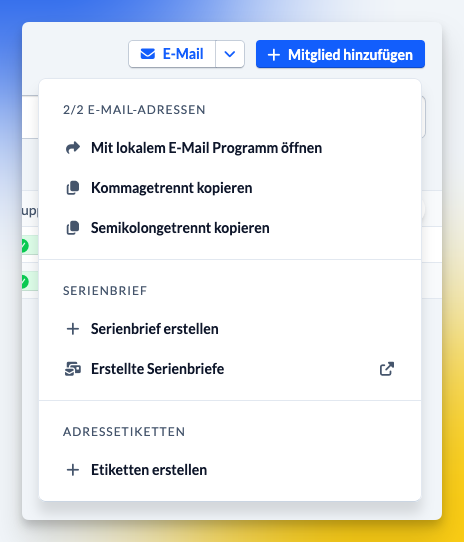
Mail merges and address labels can now be created directly from a member list. For example, filter group members by a specific status and then use exactly that selection for a mail merge or address labels.
Create group member fields directly in the registration form
If you’re missing a suitable group member field while creating a registration form, you can now create it directly while adding it. You no longer have to leave the settings and create the field somewhere else first.
A better overview in the group history
The group history is a great help when you want to see who did what in a group and when. This version sheds even more light on what’s going on. The icons have been improved so you can see more quickly what happened while scrolling. We’ve also added more filters so you can narrow things down to specific actions. That clears everything up, right?

Clearer filters in member lists
Filters in group member lists are now organized into group member fields and person fields. This makes it easier to see what type of data a filter refers to and to put together more complex filters in a more targeted way.

Set default values for Yes/No fields
For group member fields of the “Yes/No field” type, you can now set a default value when creating the field. This means that new group memberships automatically start with the desired default value.

Manage saved views more quickly
Saved views in the Groups module can now be edited and deleted directly from the sidebar. This makes it quicker to adjust existing views or remove views you no longer need.
Register additional people via the public page
If “Additional people may be registered” is enabled in the registration settings, you’ll now find a link to the registration form on the public page both on the group details page and in the registration dialog. From there, additional people can be registered directly.
For example, if a registration is mentioned in a post, a user can get to the registration form more quickly to register additional people.


Notifications for mentions in posts
When someone is mentioned in a post or comment, they will now receive a notification – provided they can see the relevant post. This makes direct mentions in communication less likely to go unnoticed.
Format event descriptions and mention content
Descriptions for events and event tags now support formatted text as well as mentions of people, groups, songs, and wiki pages. The new formatting is also displayed in other calendar views, on the Info Screen, and in change notification emails. This allows important information to be structured directly in the event description and linked to relevant content.

Links in ICS files
The ICS file attached to meeting request emails can now also contain links. For example, a Zoom or Teams link can be included directly with the calendar entry.
More placeholders for Check-in labels
The Check-in module includes a feature for sending labels to a printer during check-in. You can now use person, group, and group membership fields as placeholders on Check-in labels, just as you’ve been able to do in emails for a long time. This lets you customize labels more closely to your use case and, for example, automatically print additional information from a group membership.

Transfer budgets between cost centers
Budgets can now be transferred from one cost center to another. This makes it possible to distribute existing budgets more flexibly between different cost centers within financial planning.
Simply select the same account for both the account and contra account in the booking form, and the option to specify two cost centers will appear.


Import many bank statements faster
Importing many bank statements from a ZIP file has been sped up. Especially when importing larger numbers of bank statements, this reduces the waiting time.
More consistent booking forms
The booking forms under “Bookings” and “Bank Statements” have been aligned. This gives you a more consistent experience across both workflows.
Public Relations: New affiliation “Evangelische Bibelgemeinschaft e. V.”
Evangelische Bibelgemeinschaft e. V. is now available as a selectable affiliation in Public Relations.
Set the system region
In addition to the time zone, admins can now also set the system region in the System Settings. In the future, this setting will be used for regional formatting, among other things.

Manage agendas via the REST API
The REST API has been expanded with endpoints for creating and editing agendas. This allows connected systems to create and modify agendas via the API.
Retrieve permission origins via the API
New REST API endpoints make it possible to see where a person’s permissions come from. GET /api/permissions/origins/global/persons/{personId} and GET /api/permissions/origins/internal/persons/{personId} return the sources of global and group-internal permissions, such as status, person, group role, or group type role. This makes it easier to trace the origin of a permission, particularly when working with integrations or troubleshooting.
Increase in the Minimum Required iOS Version for the App
With the next app version (v0.80), we are raising the required operating system version for iOS devices. You will then need at least iOS 16.4. Approximately 0.3% of iOS users are affected. We are making this change to improve the app’s security and stability.
Raising the minimum iOS version does not mean that affected users will immediately lose access to the app. It means that they will no longer receive updates. So for now, the ChurchTools app will continue to work as usual. Over time, however, compatibility issues may arise that can no longer be resolved—which is why we advise against continuing to use older iOS versions indefinitely.
Further changes
If this is not enough for you, you will find all changes of this and earlier versions in our Changelog.
We hope you like the new version as much as we do. As always, you may leave praise and constructive feedback in our forum.