
 Posted by
 The last few months have been wild and exciting. The turn of the year grabbed us right away and threw us into new adventures. In January, our developers went away for a week to focus on a specific topic during their Hacking Week. Last week, we were in Dortmund with a large team and presented ourselves at the Willow Creek Leadership Congress. I was very happy to meet and talk to so many interested parties, but especially to you, our existing customers.
February is here, and we are pleased to present the new ChurchTools version 3.129 with improvements to routines, groups, the finance module, posts, and the calendar.
Copy and save routines, improved permissions
Copy routines when duplicating groups
When you duplicate a group, you can now also transfer the associated routines directly. This saves you time and prevents you from having to manually recreate recurring processes. This is particularly useful when starting a new home group or another small group with a similar structure—you can simply copy everything over and get started right away.

Email notification in case of errors in routines
If an error occurs in a routine, the people who have permission to edit routines are automatically notified by email. This means that responsible users are immediately informed and can react more quickly. This ensures greater transparency and helps to ensure that important processes—such as automatic reminders or follow-ups—function reliably.
Save and activate routines in one step
You can now activate routines directly when saving them—all in one step. This makes setting up new processes much more efficient because you no longer have to switch between different statuses. Ideal if you create a new routine and want it to be ready for use immediately.
Extended permissions for follow-ups in routines
Follow-ups within routines can now also be created and edited by users who have the permissions to administer groups, edit groups, or edit groups of a specific grouptype. This makes collaboration more flexible because more responsible persons can make adjustments without requiring additional rights.
Group table: New columns
The group table already provides you with a lot of information, which you can show or hide yourself using the gear icon. In this version, we have added additional columns that are of interest to administrators: It is now possible to display the current status of the last automatic membership execution or the status of the group chat. This gives you a good overview of the status of your groups.
Hovering over this cell takes you directly to the settings (group chat or automatic membership) for this group.

Quick search: Create people or groups
Quick search truly lives up to its name. There is no faster way to navigate to a person or group. Some actions were already available in Quick search, which takes you to specific locations in ChurchTools.
But why jump to another module to create a person or group? That’s exactly what we thought. You can now create new people or groups directly via the quick search.


New donation receipt templates in the template editor
New templates for donation receipts are now available, which can be edited even more easily with the template editor. This makes it easier for you to customize the layout, content, and placeholders to suit your needs. This is particularly helpful if you want to add individual wording or additional information for your donors.

Create opening balance sheet values retrospectively
Opening balance sheet values could already be posted in the past when creating a new accounting year; now this can also be done after creation via the context menu in the master data. This gives you more flexibility if values were not complete when creating the accounting year or if something changes afterwards. This allows you to make corrections cleanly and directly in the system.

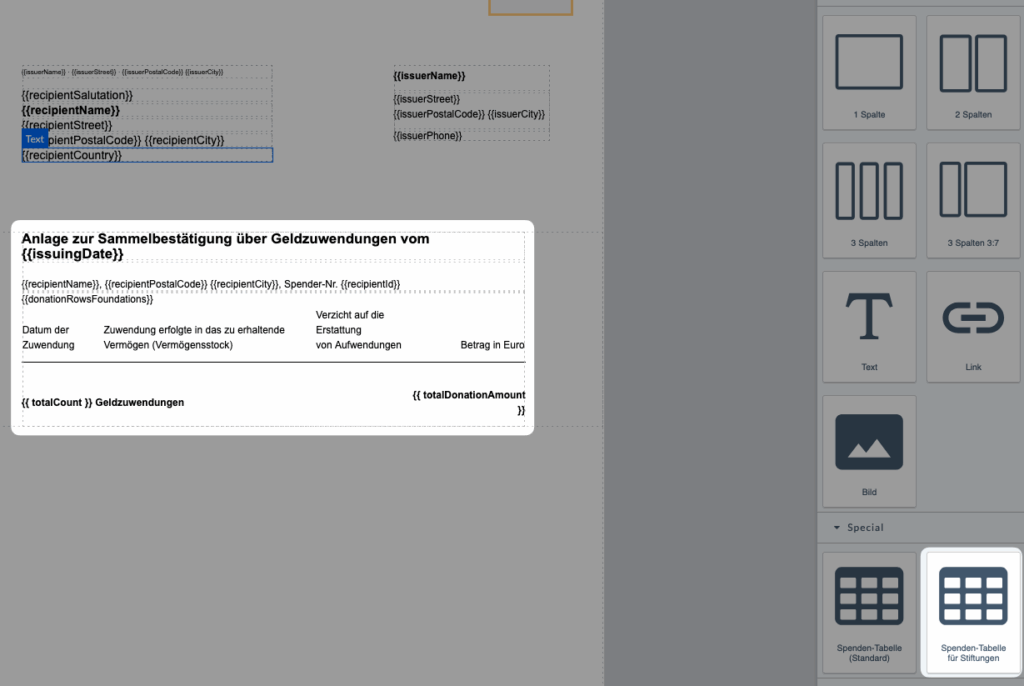
Special table for the donation receipt appendix for foundations
There is now a separate table for foundations for the donation receipt appendix. For foundations, the tax office requires a slightly modified table for listing donations.
Series dates more clearly recognizable
Recurring appointments are probably as common in every church community as the Amen in church. With this version, recurring events in the calendar are better marked with a small icon and made more recognizable for us users.

Meeting requests: ICS attachment in email
If you are invited to a meeting, ChurchTools will notify you via email. This email now includes an ICS attachment. This is a calendar file that allows you to add the appointment directly to your local calendar program (Outlook, Teams, Google). The standard behind this also allows you to send a direct reply to the meeting request.
The great thing is that many email programs recognize the open request and offer you buttons to accept or decline directly. So you don’t necessarily have to go into ChurchTools to confirm a request.
Further changes to the calendar
Show/hide all calendars
In the left sidebar next to the calendars, you now have the option to show or hide all calendars at once.
Add exceptions more quickly
Exceptions or manual appointments can be added to a recurring appointment. This opens a small tooltip calendar where you can select an appointment. This tooltip calendar remembers the last month you opened and now displays it directly. This makes adding such appointments much faster.
Contributions: Standard mailing date for email summary
Each user can activate the email summary for themselves in the post module and also select the day of the week. This feature is not new, but now an administrator can specify the day of the week on which this email should be sent by default. However, users can still set their own preferences.

Logging in to ChurchTools via third-party systems
In recent versions, we have already discussed the new option to configure login to ChurchTools via third-party systems (OAuth). We have now made a few more improvements in this area:
Logos from third-party system providers
When logging in via a third-party system, the logos of the respective providers are now displayed directly on the login buttons. For ChurchTools systems, the respective system logo is loaded automatically, while for other providers, the favicon is used. This provides greater clarity on the login page and helps users identify the correct login method more quickly.

Saved consent for OAuth login
When logging in via OAuth, consent to data sharing is now saved. This means that the consent dialog will be skipped the next time you log in. This makes the login process faster and more convenient for users, especially if they regularly log in via the same third-party system.
Standard login can be hidden when logging in to third-party systems
If you have set up login via a third-party system, you can now hide the default login in ChurchTools. This will automatically disable registration. Important: If you want to enable registration, the default login must be enabled. This allows you to clearly control how users can log in and keeps your login page tidy.
Further changes
If this is not enough for you, you will find all changes of this and earlier versions in our Changelog.
We hope you like the new version as much as we do. As always, you may leave praise and constructive feedback in our forum.